> For the complete documentation index, see [llms.txt](https://docs.digit.org/llms.txt). Markdown versions of documentation pages are available by appending `.md` to page URLs; this page is available as [Markdown](https://docs.digit.org/platform/guides/operations-guide/postgresql-ha.md).
# Postgresql HA
## Overview
This document provides a comprehensive guide on how to install PostgreSQL on an EC2 instance, set up replication for high availability, and perform version upgrades.
## Pre-requisites
* AWS Account
* Two Ubuntu EC2 Instances
## Install PostgreSQL
1. **Set Up EC2 Instances**
a. **Log in to the AWS Management Console:** - Open the AWS Management Console and search for "EC2."
b. **Create the Primary Server:** - Navigate to "Instances" and click on "Launch Instance." - Configure the instance with the desired specifications and choose an appropriate name, such as "Primary Server."
c. **Create the Standby Server:** - Repeat the process to launch another instance. - Name this instance "Standby Server."
2. **Configure Security Groups**
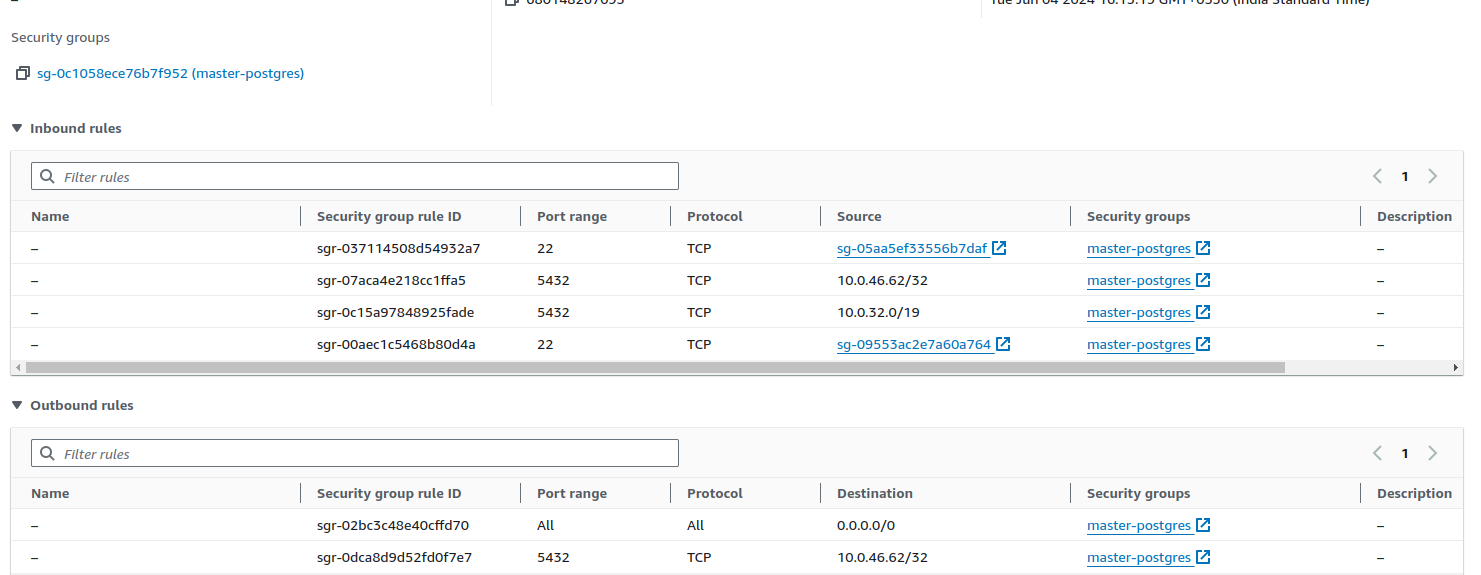
a. **Edit Security Group for Primary Server:** - Go to the EC2 dashboard, select the Primary Server instance, and click on the "Security" tab. - Edit the inbound and outbound rules of the security group associated with the Primary Server to allow traffic from the Standby Server. This includes: - Allowing PostgreSQL traffic (default port 5432). - Adding custom TCP rules to allow connections from the IP address of the Standby Server.
b. **Edit Security Group for Standby Server:** - Similarly, go to the EC2 dashboard, select the Standby Server instance, and click on the "Security" tab. - Edit the security group to allow the necessary traffic from the Primary Server. - Ensure the Standby Server can receive data from the Primary Server by setting up appropriate inbound and outbound rules.
3. After creating the EC2 instances, follow these steps to log in to both the primary and standby servers using the provided PEM key.
```
# Open a terminal and add the PEM key to your SSH agent to avoid entering the key passphrase for every new terminal session.
ssh-add "" #To avoid ssh in every teminal
# Ensure the PEM key is added correctly by listing the keys in your SSH agent.
ssh-add -l
# log in to the primary server using its IP address.
ssh ubuntu@
#Open another terminal and log in to the standby server using its IP address.
ssh ubuntu@
```
4. After logging into both the primary and standby EC2 instances, follow these commands to install PostgreSQL
```
ubuntu@10.0.45.78:~$ sudo apt install curl ca-certificates
ubuntu@10.0.45.78:~$ sudo install -d /usr/share/postgresql-common/pgdg
ubuntu@10.0.45.78:~$ sudo curl -o /usr/share/postgresql-common/pgdg/apt.postgresql.org.asc --fail https://www.postgresql.org/media/keys/ACCC4CF8.asc
ubuntu@10.0.45.78:~$ sudo sh -c 'echo "deb [signed-by=/usr/share/postgresql-common/pgdg/apt.postgresql.org.asc] https://apt.postgresql.org/pub/repos/apt $(lsb_release -cs)-pgdg main" > /etc/apt/sources.list.d/pgdg.list'
ubuntu@10.0.45.78:~$ sudo apt update
# To install version specific postgresql
ubuntu@10.0.45.78:~$ sudo apt -y install postgresql-14
ubuntu@10.0.45.78:~$ sudo systemctl start postgresql
ubuntu@10.0.45.78:~$ sudo systemctl enable postgresql
ubuntu@10.0.45.78:~$ sudo systemctl status postgresql
```
### Enabling Replication
To set up replication between the primary and standby PostgreSQL servers, follow these steps:
#### **Primary Server Configuration:**
1. Edit the postgresql.conf in the primary server
```
ubuntu@10.0.35.93:~$ sudo systemctl stop postgresql
ubuntu@10.0.45.78:~$ sudo nano /etc/postgresql/14/main/postgresql.conf
synchronous_standby_names = ''
listen_addresses = ''
synchronous_commit = on
```
2. Create a replication user to enable replication in the standby server
```
ubuntu@10.0.45.78:~$ sudo su - postgres
postgres@10.0.45.78:~$ psql postgres
postgres=# CREATE USER replication_user WITH password "password_for_user" REPLICATION;
postgres=# \q
postgres@10.0.45.78:~$ exit
```
3. Edit the pg\_hba.conf file in the primary server
```
ubuntu@10.0.45.78:~$ sudo nano /etc/postgresql/14/main/pg_hba.conf
# TYPE DATABASE USER ADDRESS METHOD
host replication replication_user 172.31.6.22/32 md5
```
4. Restart the PostgreSQL service
```
ubuntu@10.0.45.78:~$ sudo systemctl restart postgresql
```
#### **Standby Server Configuration:**
5. Edit the postgresql.conf file in the standby server.
```
ubuntu@10.0.35.93:~$ sudo nano /etc/postgresql/14/main/postgresql.conf
cluster_name = ''
listen_addresses = ''
```
6. Edit the pg\_hba.conf on the standby server
```
ubuntu@10.0.35.93:~$ sudo nano /etc/postgresql/14/main/pg_hba.conf
# TYPE DATABASE USER ADDRESS METHOD
host replication replication_user 172.31.6.22/32 md5
```
7. Now, we are setting up the replication and taking a pg\_basebackup of the master server on the slave server.
```
ubuntu@10.0.35.93:~$ sudo su - postgres
postgres@10.0.35.93:~$ cd 14
postgres@10.0.35.93:~$ mv main main_backup
postgres@10.0.35.93:~$ mkdir main/
postgres@10.0.35.93:~$ chmod 700 main/
postgres@10.0.35.93:~$ pg_basebackup -h 10.0.33.105 -U replication_user --checkpoint=fast -D /var/lib/postgresql/14/main/ -R --slot=replica_test -C
postgres@10.0.35.93:~$ exit
ubuntu@10.0.35.93:~$ sudo systemctl start postgresql
```
8. Check the replication using the commands below:
```
# On Primary Server
ubuntu@10.0.45.78:~$ sudo su - postgres
postgres@10.0.45.78:~$ psql postgres
postgres=# SELECT * FROM pg_stat_replication;
#On Standby Server
ubuntu@10.0.35.93:~$ sudo su - postgres
postgres@10.0.35.93:~$ psql postgres
postgres=# SELECT * FROM pg_stat_wal_receiver;
```
## Upgrade PostgreSQL
Below are the steps to upgrade PostgreSQL on the primary and standby servers using pg\_upgrade and rsync from version 14 to version 15.
Install postgresql-15 in both primary and standby servers
```
sudo apt install -y postgres-15
```
#### On Primary Server:
1. Stop the postgresql-14 and postgresql-15 servers
```
sudo systemctl stop postgresql@14-main
sudo systemctl stop postgresql@15-main
```
2. Run the pg\_upgrade command
```
ubuntu@10.0.45.78:~$ sudo su - postgres
postgres@10.0.45.78:~$ psql postgres
postgres@10.0.45.78:~$ /usr/lib/postgresql/15/bin/pg_upgrade -d /var/lib/postgresql/14/main -o "-c config_file=/etc/postgresql/14/main/postgresql.conf" -D /var/lib/postgresql/15/main -O "-c config_file=/etc/postgresql/15/main/postgresql.conf" -b /usr/lib/postgresql/14/bin -B /usr/lib/postgresql/15/bin --link --check
# Once check is completed the run below command
postgres@10.0.45.78:~$ /usr/lib/postgresql/15/bin/pg_upgrade -d /var/lib/postgresql/14/main -o "-c config_file=/etc/postgresql/14/main/postgresql.conf" -D /var/lib/postgresql/15/main -O "-c config_file=/etc/postgresql/15/main/postgresql.conf" -b /usr/lib/postgresql/14/bin -B /usr/lib/postgresql/15/bin --link
```
3. Edit the postgresql.conf file
```
ubuntu@10.0.45.78:~$ sudo nano /etc/postgresql/14/main/postgresql.conf
synchronous_standby_names = ''
port = 5432
listen_addresses = ''
synchronous_commit = on
wal_level = replica
max_wal_senders = 10
wal_keep_size = 256MB
archive_mode = on
archive_command = 'cp %p /var/lib/postgresql/15/archive/%f'
```
4. Edit the pg\_hba.conf file
```
ubuntu@10.0.45.78:~$ sudo nano /etc/postgresql/14/main/pg_hba.conf
# TYPE DATABASE USER ADDRESS METHOD
host replication replication_user 172.31.6.22/32 md5
```
5. Start the primary server
```
ubuntu@10.0.45.78:~$ sudo systemctl start postgresql@15-main
```
#### Standby Server:
1. Stop the postgresql-14 and postgresql-15 servers
```
ubuntu@10.0.35.93:~$ sudo systemctl stop postgresql@15-main
ubuntu@10.0.35.93:~$ sudo systemctl stop postgresql@14-main
```
2. Now run the rsync command on the master server.
```
postgres@10.0.45.78:~$ rsync -a --delete /var/lib/postgresql/15/main/ postgres@:/var/lib/postgresql/15/main/
```
3. Place a `standby.signal` file in the slave’s data directory to indicate that this is a standby server.
```
ubuntu@10.0.35.93:~$ sudo touch /var/lib/postgresql/15/main/standby.signal
```
4. Edit the postgresql.conf file
```
ubuntu@10.0.35.93:~$ sudo nano /etc/postgresql/14/main/postgresql.conf
cluster_name = ''
port = 5432
listen_addresses = ''
primary_conninfo = 'host=master_ip port=5432 user=replication_user password=replication_password'
restore_command = 'cp /var/lib/postgresql/15/archive/%f %p'
```
5. Start the standby server
```
ubuntu@10.0.35.93:~$ sudo systemctl start postgresql@15-main
```
**Verify Replication**
```
# On Primary Server
ubuntu@10.0.45.78:~$ sudo su - postgres
postgres@10.0.45.78:~$ psql postgres
postgres=# SELECT * FROM pg_stat_replication;
#On Standby Server
ubuntu@10.0.35.93:~$ sudo su - postgres
postgres@10.0.35.93:~$ psql postgres
postgres=# SELECT * FROM pg_stat_wal_receiver;
```
---
# Agent Instructions
This documentation is published with GitBook. GitBook is the documentation platform designed so that both humans and AI agents can read, navigate, and reason over technical content effectively. Learn more at gitbook.com.
## Querying This Documentation
If you need additional information that is not directly available in this page, you can query the documentation by asking a question.
Perform an HTTP GET request on the following URL with the `ask` and `goal` query parameters:
```
GET https://docs.digit.org/platform/guides/operations-guide/postgresql-ha.md?ask=&goal=
```
`ask` is the immediate question: it should be specific, self-contained, and written in natural language.
`goal` is what the user is ultimately trying to achieve, the reason they need the answer. Sharing it helps GitBook give you a better, more relevant answer. A goal is most helpful when it describes the outcome the user wants rather than restating the question. For example, with `ask=how do I create an API token`, a goal like `automate deployments from our CI pipeline` lets GitBook tailor the answer to that use case.
The response will contain a direct answer to the question and relevant excerpts and sources from the documentation.
Use this mechanism when the answer is not explicitly present in the current page, you need clarification or additional context, or you want to retrieve related documentation sections.