# Contracts

## **Overview**

1. A contract document is a legal & financial obligation between any two parties entering into the contract.
2. After the estimates are created and approved, they are grouped or individually tendered/direct assigned to vendors to execute the work.
3. A works package is typically not seen in all Works Management Products. it is used only where high-complexity projects are executed where packaging is needed to form smaller or larger chunks so as to increase operational efficiency.
4. The current contract service includes Line items of estimates, Works packaging, Negotiation, Contract Terms, and Milestones.

## **Actors**

The Junior Engineer/Assistant Engineer creates the contracts and the Municipal Engineer/Executing Officer approves the contract depending on its value. (Workflow configurations based on amount subject to platform capability in v1).

### **Create Contract**

**Story Detail**

* [x] After Estimates are created and approved for projects/sub-projects, these estimates can be grouped in specific ways to form works packages.&#x20;
* [x] The need for grouping arises in the way how the JE/ULB wants to execute the project(s). For instance -&#x20;
  * Small Projects(Estimates) of similar types in nearby localities can be grouped to form a single works package. This work package can be tendered, negotiated and contracted. (Most common need of work package)
  * A huge project(estimate) can be broken down into multiple work packages by the line items approved within the estimate. The value of the work packages in this case will be proportional to the costs of the line items. (This breakdown is already achieved by dividing projects into sub-projects and hence might not be needed during estimations)
* [x] Works package will go for tendering or direct assignment depending on the project.&#x20;

  Tendering/Negotiation can be of two types

  1. Lumpsum - Entire package will be negotiated by a percentage value or lump sum value.&#x20;
     * Running bills will be validated by the measurements of the line items in the works package.&#x20;
     * The final bill will be adjusted to the remaining amount&#x20;
  2. Percentage line item
     * Each line item will be negotiated and negotiated values will be paid as part of the contract
     * Running bills will be validated by the measurements of line items in te works package
     * The final bill will be adjusted to the remaining negotiated amount of each line item.
* [x] The contract will have milestones and only when milestones are met, payments will be made to the contractors.
* [x] The contract will also have terms and conditions (text only in v1, to be codified in v2)
* [x] The contract will have an approval workflow. Upon clicking proceed to forward on the last tab, the user will be shown a popup to select forwarding details.
* [x] Rejected contracts will come to the inbox of the creator for any modifications.
* [x] Statuses of Contract
  1. Created
  2. In progress
  3. Approved
  4. Rejected (Rejected in Workflow. Comes to the inbox of the creator. Can be edited and resent for approval)
  5. Cancelled (Completely Cancelled. Cannot be edited)

|                                                                                                                                                                                                                                                                                                                                                                                                                                                                                                                                                                                                                                                                                                                                                                                                                                                                                                                                                                                                                                                                                                                                                         |                                                                                                                           |
| ------------------------------------------------------------------------------------------------------------------------------------------------------------------------------------------------------------------------------------------------------------------------------------------------------------------------------------------------------------------------------------------------------------------------------------------------------------------------------------------------------------------------------------------------------------------------------------------------------------------------------------------------------------------------------------------------------------------------------------------------------------------------------------------------------------------------------------------------------------------------------------------------------------------------------------------------------------------------------------------------------------------------------------------------------------------------------------------------------------------------------------------------------- | ------------------------------------------------------------------------------------------------------------------------- |
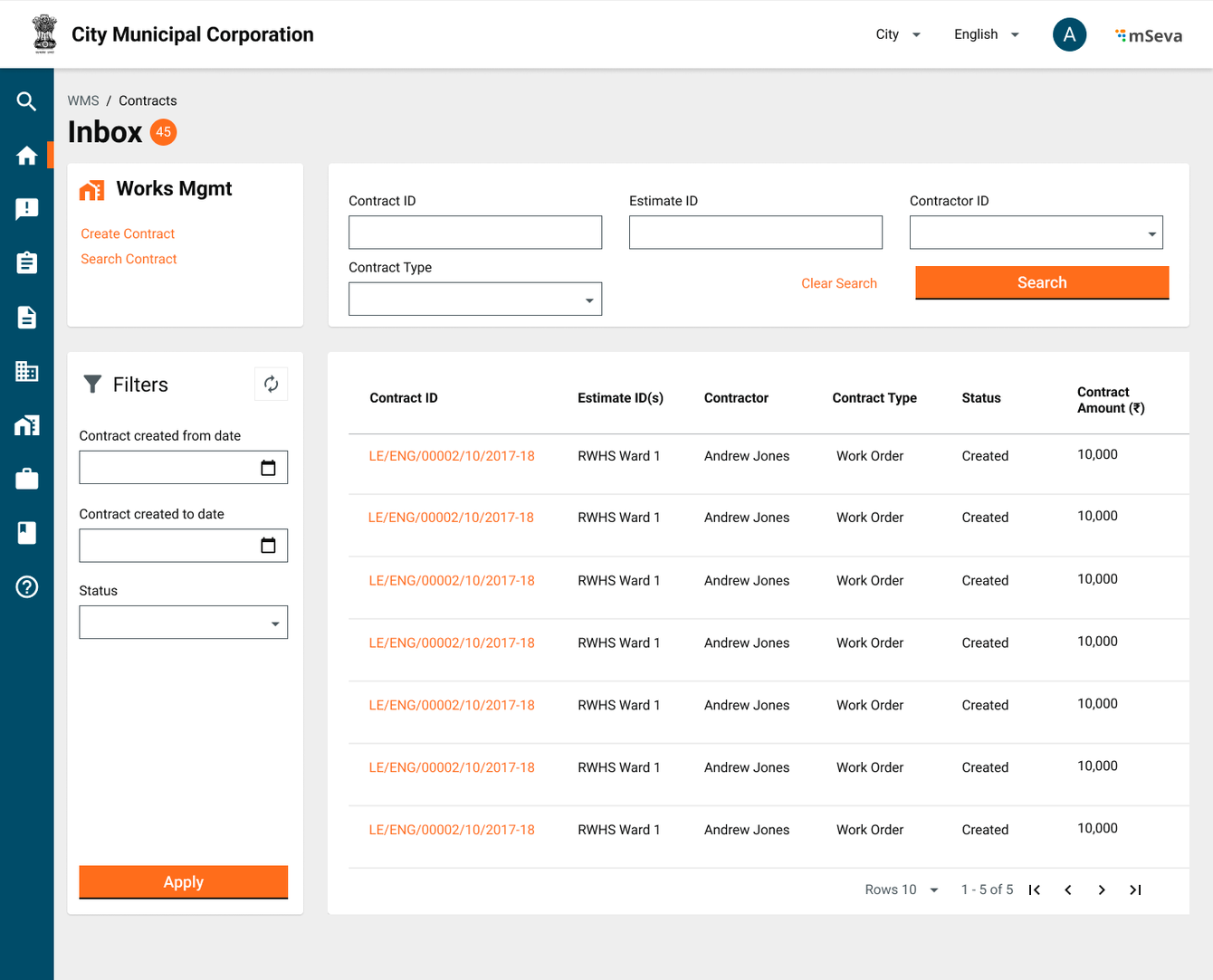
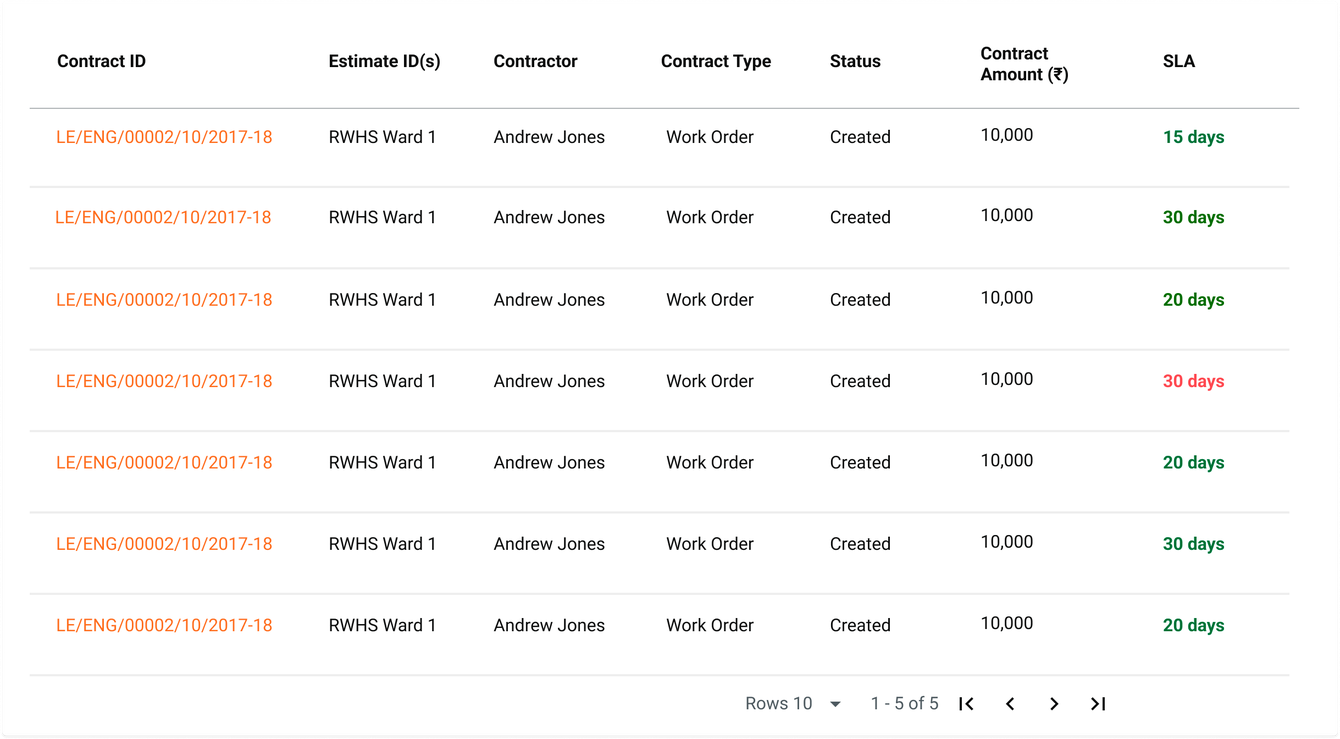
| **Contract Inbox**                                                                                                                                                                                                                                                                                                                                                                                                                                                                                                                                                                                                                                                                                                                                                                                                                                                                                                                                                                                                                                                                                                                                      |                                                                                                                           |
| <ol><li>Clicking on the <strong>Contracts</strong> link on the home screen navigates users to a default contract inbox screen.</li><li>Default inbox items will be empty for a contract creator.</li><li><p>Users can filter and search using the following options</p><ul><li><strong>Contract ID</strong></li><li><strong>Estimate ID</strong> - Show a list of all contracts by each row when a particular estimate falls in all those contracts.</li><li><strong>Contractor ID</strong></li><li><strong>Contract Type</strong></li><li><strong>Contract Created from date</strong></li><li><strong>Contract Created To date</strong></li><li><strong>Status</strong></li></ul></li><li><p>Columns in the Table</p><ul><li><strong>Contract ID</strong></li><li><strong>Estimate ID</strong>(s) - If a contract is formed with multiple estimates show an array of estimates.</li><li><strong>Contractor</strong></li><li><strong>Contract Type</strong></li><li><strong>Status</strong></li><li><strong>Contract Amount</strong></li><li><strong>SLA</strong></li></ul></li></ol>                                                                   | <p><img src="/files/RoMSAdrlFDMZWDy9r5MR" alt=""><img src="/files/0w6iVlaPnxAZc4qXPmur" alt=""></p><p></p><p></p><p> </p> |
| **Search Estimates to Create Contract**                                                                                                                                                                                                                                                                                                                                                                                                                                                                                                                                                                                                                                                                                                                                                                                                                                                                                                                                                                                                                                                                                                                 |                                                                                                                           |
| <ol><li>Click on <strong>Create Contract</strong> in the contract inbox to search for approved Estimates.</li><li>Users can multi-select approved estimates to create contracts.</li><li><p>Search parameters</p><ul><li><strong>Estimate ID</strong></li><li><strong>Project ID</strong></li><li><strong>Department</strong></li><li><strong>Status</strong></li><li><strong>Estimate created from date</strong></li><li><strong>Estimate Created to Date</strong></li></ul></li><li><p>Table Columns</p><ul><li><strong>Estimate ID</strong></li><li><strong>Project ID</strong></li><li><strong>Department</strong></li><li><strong>Status</strong> (of the estimate)</li><li><strong>Estimated Amount</strong></li></ul></li><li><p>Select the estimates using checkboxes - a counter shows at bottom of the page.</p><ul><li>it should be allowed to search/re-search using the filters while the selection is frozen.</li><li>Refreshing the page might lose the selections from UI.</li><li>Clicking on create contract will add selected estimates to the respective contract UI to be further actionable(on the next page)</li></ul></li></ol> | ![](/files/GRP8MYeXx6QaW9dyQHBn)                                                                                          |
| **Create Contract - Header & Contractor Details**                                                                                                                                                                                                                                                                                                                                                                                                                                                                                                                                                                                                                                                                                                                                                                                                                                                                                                                                                                                                                                                                                                       |                                                                                                                           |
| <ol><li>Contract creation UI displays the headers and multiple tabs.</li><li>Attribute details are added separately in the story</li><li><p><strong>Contract Amount</strong> is a display-only field.</p><ul><li>Value dynamically changes based on selections in the work details and the negotiation tab</li><li>Initially, the contract amount is the sum of selected estimates</li><li>But, if in the work details, certain line items are removed from the estimates, then only the remaining amount needs to be displayed in the <strong>Contract Amount</strong></li><li>In the negotiation tab, only line items that are fixed from the work details tab are shown. These will have negotiated percentage/amount values for each line item.</li><li>Only the finalised sum of negotiated values is to be shown as the Contract Amount</li></ul></li><li><strong>Contractor ID</strong> is a display-only field. It is shown on searching and selecting a contractor from the contractor select drop-down.</li></ol>                                                                                                                             | ![](/files/H7NzZJ6QSInHQXjUqupI)                                                                                          |
| **Work Details**                                                                                                                                                                                                                                                                                                                                                                                                                                                                                                                                                                                                                                                                                                                                                                                                                                                                                                                                                                                                                                                                                                                                        |                                                                                                                           |
| <ol><li>The <strong>Work Details</strong> section shows the list of estimates and estimates for the line items from the selection made before coming to the contract screen.</li><li>Estimate line items that are already selected and part of other created contracts should show up as non-selectable line items in this table UI.</li><li>Users can select line items from different estimates and the final amount of selected line items will show up in the <strong>Contract Amount</strong> under header details</li><li>Clicking on next will take the user to the <strong>Negotiation</strong> tab.</li></ol><p></p>                                                                                                                                                                                                                                                                                                                                                                                                                                                                                                                           | ![](/files/fJ6QWUtIgLCzgWi2nUBj)                                                                                          |
| **Negotiation Details**                                                                                                                                                                                                                                                                                                                                                                                                                                                                                                                                                                                                                                                                                                                                                                                                                                                                                                                                                                                                                                                                                                                                 |                                                                                                                           |
| <ol><li><p>Negotiation is of two types</p><ul><li>Percentage-tender (Lumpsum)</li><li>Item rate negotiation</li></ul></li><li>In Lumpsum, the entire contract is negotiated by a certain amount/percentage.</li><li>On the UI, we will capture by percentage and calculate the final amount of the contract.</li><li>The same will be displayed on Contract Amount in the Header details</li><li>For the Item rate negotiation type, line items selected in the <strong>Work Details</strong> tab only will be shown in a table.</li><li>This table will have a column for the users to input either amount or percentage of the line item that is negotiated.</li><li>Finalised amount, the sum of all negotiated values is the contract amount.</li></ol><p></p>                                                                                                                                                                                                                                                                                                                                                                                      | ![](/files/8iVXD3youPWgd9SO4Rvc)![](/files/FhhDAteKCyMqx8ysZyPo)![](/files/OfuWzkXqnKkW8Z0pZ6oY)                          |
| **Milestones Creation**                                                                                                                                                                                                                                                                                                                                                                                                                                                                                                                                                                                                                                                                                                                                                                                                                                                                                                                                                                                                                                                                                                                                 |                                                                                                                           |
| <ol><li>Milestones are tagged to a certain percentage of completion of the project.</li><li>There will be milestone templates(v2) based on project type and subtype. Users will only have to fill in start and end dates then.</li><li><p>A contract can have any number of milestones.</p><ul><li>The sum of % completion of all these milestones however should add up to 100%</li></ul></li></ol><p></p>                                                                                                                                                                                                                                                                                                                                                                                                                                                                                                                                                                                                                                                                                                                                             | ![](/files/pFxJlS9NuvV4BvwHqJtV)                                                                                          |
| **Terms and Conditions**                                                                                                                                                                                                                                                                                                                                                                                                                                                                                                                                                                                                                                                                                                                                                                                                                                                                                                                                                                                                                                                                                                                                |                                                                                                                           |
| Terms and conditions are an array of upto 100 strings in V1.                                                                                                                                                                                                                                                                                                                                                                                                                                                                                                                                                                                                                                                                                                                                                                                                                                                                                                                                                                                                                                                                                            | ![](/files/eMRpdRHu4NnlofTlzWnM)                                                                                          |

| View Contract                                                                                                                                                                                                                                                                                                                                                                                                                                                                                                                                                                                                                                                                                                                                            |                                                                                                  |
| -------------------------------------------------------------------------------------------------------------------------------------------------------------------------------------------------------------------------------------------------------------------------------------------------------------------------------------------------------------------------------------------------------------------------------------------------------------------------------------------------------------------------------------------------------------------------------------------------------------------------------------------------------------------------------------------------------------------------------------------------------- | ------------------------------------------------------------------------------------------------ |
| <ol><li>Users can click on <strong>Contract ID</strong> in their inboxes to come to view the contract screen.</li><li>The <strong>View Contract</strong> attributes is the same as <strong>Create Contract</strong> attributes from a UI perspective. All the fields are standard view-only components.</li><li>The <strong>View Contract</strong> screen will additionally have the <strong>Contract ID</strong> displayed in the header details</li><li><p>Depending on the user and path selected <strong>View Contract</strong> will have the call to action options.</p><ol><li><p>For users in the workflow</p><ul><li>Approve</li><li>Reject</li></ul></li><li><p>For final users</p><ul><li>Approve</li><li>Reject</li></ul></li></ol></li></ol> | ![](/files/J9YwJ1drbPwJ4KquIJa3)                                                                 |
| **Search Contract**                                                                                                                                                                                                                                                                                                                                                                                                                                                                                                                                                                                                                                                                                                                                      |                                                                                                  |
| 7e90bee5f5434cf487fc78fc337a799e-8519c475997e454f8920f0d0f702400a                                                                                                                                                                                                                                                                                                                                                                                                                                                                                                                                                                                                                                                                                        | ![](/files/EdZbjGaNICSGKDeiExkd)![](/files/XrsWydkomsgdqQP8g3ah)![](/files/PQx5W282VZYobdFNHWbD) |
| **Modify Contract**                                                                                                                                                                                                                                                                                                                                                                                                                                                                                                                                                                                                                                                                                                                                      |                                                                                                  |
| <ol><li>Before the contract is finally approved, all fields should be editable. System-generated <strong>Contract ID</strong> is non-editable.</li><li><p>By the time contract becomes editable, some of the estimates/estimate line items could possibly be added to other contracts.</p><ol><li>The system should ensure the same line items are not part of 2 different created contracts</li></ol></li><li><strong>Base Contracts</strong> once issued and accepted cannot be modified</li></ol>                                                                                                                                                                                                                                                     |                                                                                                  |
| **Revised Contracts (v2)**                                                                                                                                                                                                                                                                                                                                                                                                                                                                                                                                                                                                                                                                                                                               |                                                                                                  |
| <ol><li>Estimates go through revision and also need a revised contract to be issued</li><li>A revised contract can be a change in line items (scope) or a change in the amount</li></ol>                                                                                                                                                                                                                                                                                                                                                                                                                                                                                                                                                                 |                                                                                                  |

| <ol><li>Search contract flow helps in searching any contract in the system (Currently in progress or old contracts or rejected contracts)</li><li>Users have the option on the contract <strong>Inbox</strong> to search for contracts. Clicking on that link will get users to the contract search page</li><li><p>Default is an empty page with a set of search options</p><ul><li><strong>Contract ID</strong></li><li><strong>Estimate ID</strong> - Searching for project ID should list all contracts that are part of that project</li><li><strong>Contract Type</strong></li><li><strong>Contractor ID</strong></li><li><strong>Contract Created from Date</strong></li><li><strong>Contract Created to Date</strong></li></ul></li><li><p>Contract search results table -</p><ul><li><strong>Contract ID</strong></li><li><strong>Estimate ID</strong></li><li><strong>Contractor</strong></li><li><strong>Contract Type</strong></li><li><strong>Status</strong></li><li><strong>Contract Amount</strong></li></ul></li><li>Clicking on any <strong>Contract ID</strong> will take the user to the <strong>View Contract</strong> screen</li></ol> |
| ------------------------------------------------------------------------------------------------------------------------------------------------------------------------------------------------------------------------------------------------------------------------------------------------------------------------------------------------------------------------------------------------------------------------------------------------------------------------------------------------------------------------------------------------------------------------------------------------------------------------------------------------------------------------------------------------------------------------------------------------------------------------------------------------------------------------------------------------------------------------------------------------------------------------------------------------------------------------------------------------------------------------------------------------------------------------------------------------------------------------------------------------------------ |


---

# Agent Instructions: Querying This Documentation

If you need additional information that is not directly available in this page, you can query the documentation dynamically by asking a question.

Perform an HTTP GET request on the current page URL with the `ask` query parameter:

```
GET https://docs.digit.org/works/specifications/functional-specifications/contracts.md?ask=<question>
```

The question should be specific, self-contained, and written in natural language.
The response will contain a direct answer to the question and relevant excerpts and sources from the documentation.

Use this mechanism when the answer is not explicitly present in the current page, you need clarification or additional context, or you want to retrieve related documentation sections.
