Product Requirements Document v2.0
Introduction
Mukhyamantri Karma Tatpara Abhiyan Yojana ( MUKTA Yojana) is a government scheme and This scheme is helpful for the poor urban people, which leads to the rising of the employment rate of the state. This document is prepared to detail out the specification MUKTASoft v2.0.
MUKTASoft aims to improve the overall scheme efficiency of MUKTA by identifying & providing equal job opportunities to the urban poor, construct environment-friendly projects, develop local communities and slums & plan better for upcoming years.
Purpose
The purpose of this document is to give a detailed description of the requirements for the MUKTASoft v2.0. It will illustrate the purpose and complete declaration for the development of the system. It will also explain system constraints, interface and interactions with other external applications. This document is primarily intended to define the scope of the version v2.0 and propose to the stakeholders for its approval and as a reference for developing the next version of the system for the development team.
Definitions, Acronyms & Abbreviations
JE
Junior Engineer
ME
Municipal Engineer
EO
Executive Officer
MC
Municipal Corporation
DDO
Drawing and Disbursing Officer
SOR
Schedule of Rates
WO
Work Order
PO
Purchase Order
MB
Measurement Book
Source of Information
2. Field Visit to Dhenkanal and Jatni ULBs [21st & 22nd June 2023]
In Scope
Schedule of Rates
Material
Machinery
Labour
Works (Includes Material, Machinery, Labour)
Detailed Estimate
Detailed Measurement Book
Muster roll and purchase bill validations
Scope of v2.1, v2.2, v2.3, v2.4 and v2.5
Rate Analysis
Estimate Template
Analysis Statements
Labour Analysis
Material Analysis
Machinery Analysis
Revise Estimate
Revise Work Order
Cancel Work Order
Utilization Statements
Labour Utilization Statement (Quantity of Work Completed)
Material Utilization Statement
Machinery Utilization Statement
Project Closure
Dashboard Enhancements
Functional Details
Actors
Create SOR
Yes
No
Search SOR
Yes
Yes
View SOR
Yes
Yes
Modify SOR
Yes
No
Add/Modify Rate
No
Yes
Schedule of Rates
labourThe basic rate of material, labour, and machinery is decided by the state public works department which would be the same for a group of ULBs and then the final cost of SORs would vary from ULB to ULB based on the Conveyance and Royalty Charges applicable for the ULB.
Units of Measurement
CUM
QNTL
MT
NOs
KG
LTR
SQM
HOUR
EACH
MTR
KL
SOR Heads
Basic Rate (Material, Labour, Machinery)
Conveyance
Royalty
Labour Cess
SOR Type
There are a total of 4 types of SOR.
1
M
Material
2
L
Labour
3
E
Machinery
4
W
Works
SOR Sub Type
sub-typesThe SOR of type works are grouped into various sub-types as given below.
1
EW
EARTH WORK
2
CC
CEMENT CONCRETE
3
RC
RCC WORK
4
MB
MASONRY BRICK WORK
5
MS
MASONRY STONE WORK
6
PL
PLASTERING
7
WC
WHITE & COLOUR WASHING
8
FL
FLOORING
9
PA
PAINTING
10
RD
ROAD WORK
11
WD
WOOD WORK
12
RF
ROOFING
13
DI
DISMANTLING
14
PB
PAVER BLOCK
15
SC
SITE CLEARANCE
16
PF
PILE FOUNDATION
17
IW
IRON WORK
18
BI
OTHER BUILDING ITEMS
SOR Variants
1
FN
Excavation in Foundation
2
GF
Ground Floor
3
SF
Second Floor
4
TF
Third Floor
5
PL
Foundation and Plinth
6
SG
Super Structure (GF)
7
SS
Super Structure (SF)
8
ST
Super Structure (TF)
9
BS
Basic
Schedule of Rates
The scheduled items for which the works department publishes the rates are known as the schedule of rates. There are mainly 4 types of items for which schedules of rates are published.
Material - These are the material items which are required to accomplish a work.
Labour - The skilled and unskilled labourers who are required to accomplish the work.
Machinery - These are the equipment which are required to accomplish the work.
Works - The composition of material, labour, and machinery together form a building block for a work.
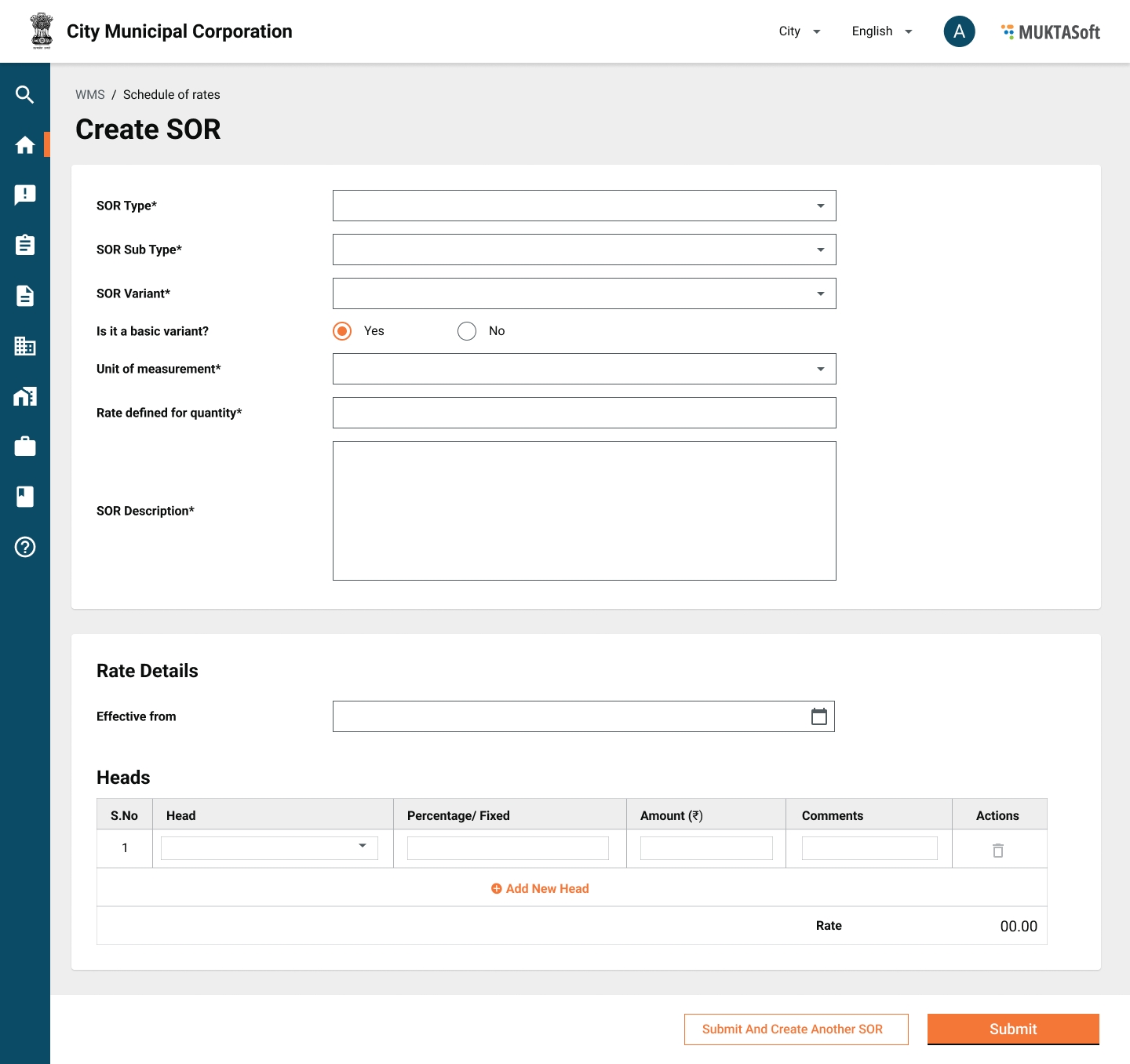
Create
In MUKTA only a limited set of SORs are being used to estimate a work and initially, only the relevant SOR items are created. The option to create an SOR is provided to help the user take any missing or new SOR into the system as and when needed.
Attributes
1
SOR Type
Yes
Material, Labour, Machinery, Works.
2
SOR Sub Type
Yes
Applicable for SOR type Works only.
3
SOR Variant
No
Applicable for SOR type Works only.
4
Unit of Measurement
Yes
Unit of measurement for the item.
5
Rate Defined for Quantity
Yes
Quantity of items for which basic rate is defined.
6
Description
Yes
Name of item as per the standard definition of OPWD
Rate Details
Optional
7
Effective From
Yes
The date given rate will become effective, it can be a past and future date.
Heads
Grid
To select a head whichever is applicable.
8
Basic Rate
Yes
The basic rate of the item defined by the OPWD
9
Conveyance
No
The conveyance charges applicable based on the distance item is carried.
10
Royalty
No
The royalty amount on the items as per the state mining department.
11
Labour Cess
No
It is applicable for works items only and calculated on Basic + Conveyance + Royalty.
12
Rate
Display
A calculated value.
Mockups
Search SOR
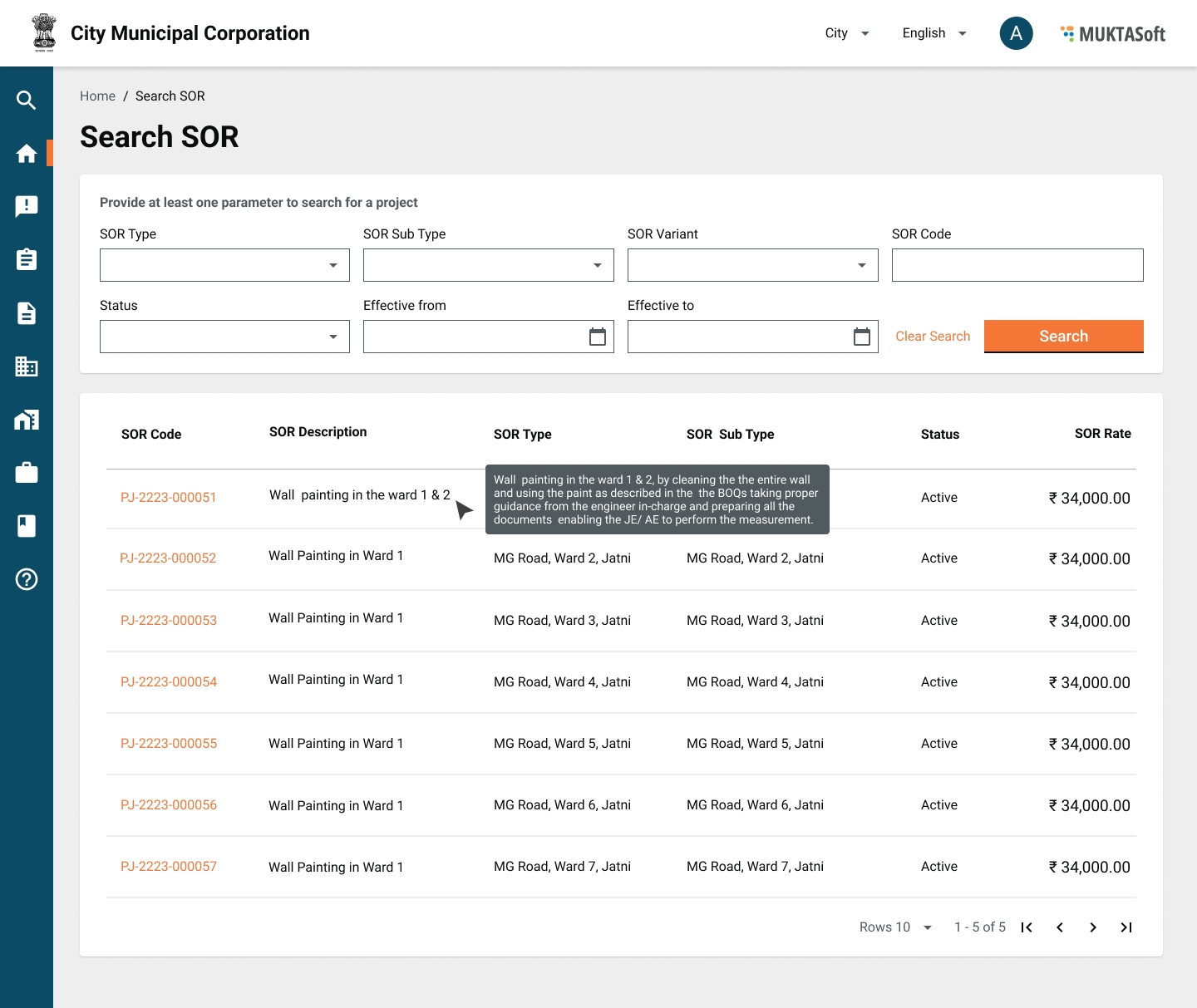
Search SOR provides the option to the user to search an SOR to see the details and modify it to bring the new rates into effect from a well-defined effective date.
Search Criteria
1
SOR Code
Text
It is system system-generated unique code to identify the SOR uniquely
2
SOR Type
Drop-down
SOR types, the values from SOR Type Master.
3
SOR Sub Type
Drop-down
SOR subtypes, the values from SOR Sub Type Master
4
SOR Variant
Drop-down
SOR variants, the values from Variant master
5
Status
Drop-down
Active/ Inactive
6
Effective From
Date
The rate effective from date
7
Effective To
Date
The rate effective from date
Search Result
The search result always displays the currently effective rates unless the search is for a different effective period.
1
SOR Code
It is system generated unique code to identify the SOR uniquely.
2
SOR Description
It is the description of SOR to describe the SOR.
3
SOR Type
SOR types, the values from SOR Type Master.
4
SOR Sub Type
SOR sub types, the values from SOR Sub Type Master.
5
Status
The status of SOR, Active/ Inactive.
6
Rate
The current effective rate of the SOR.
Mockups
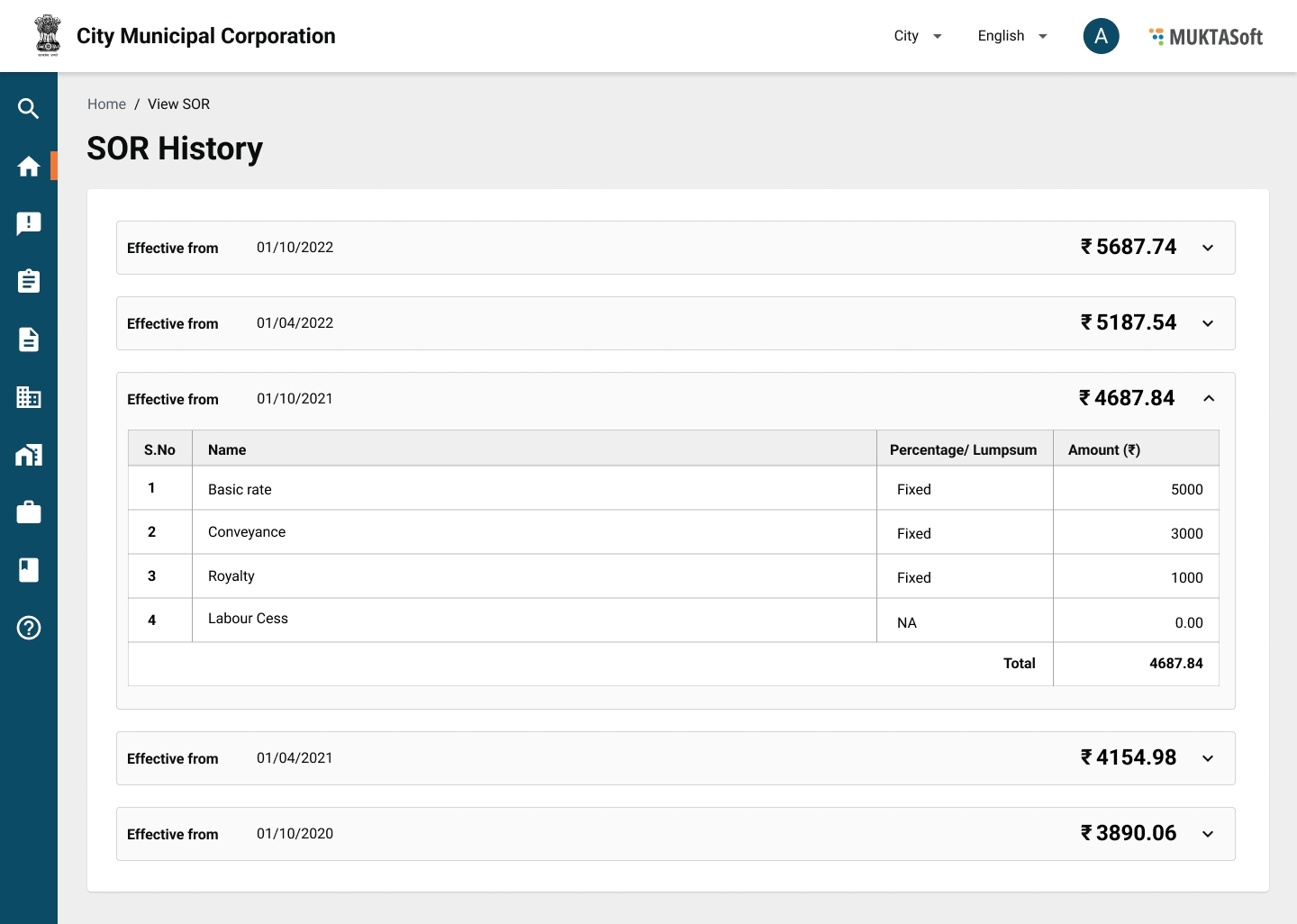
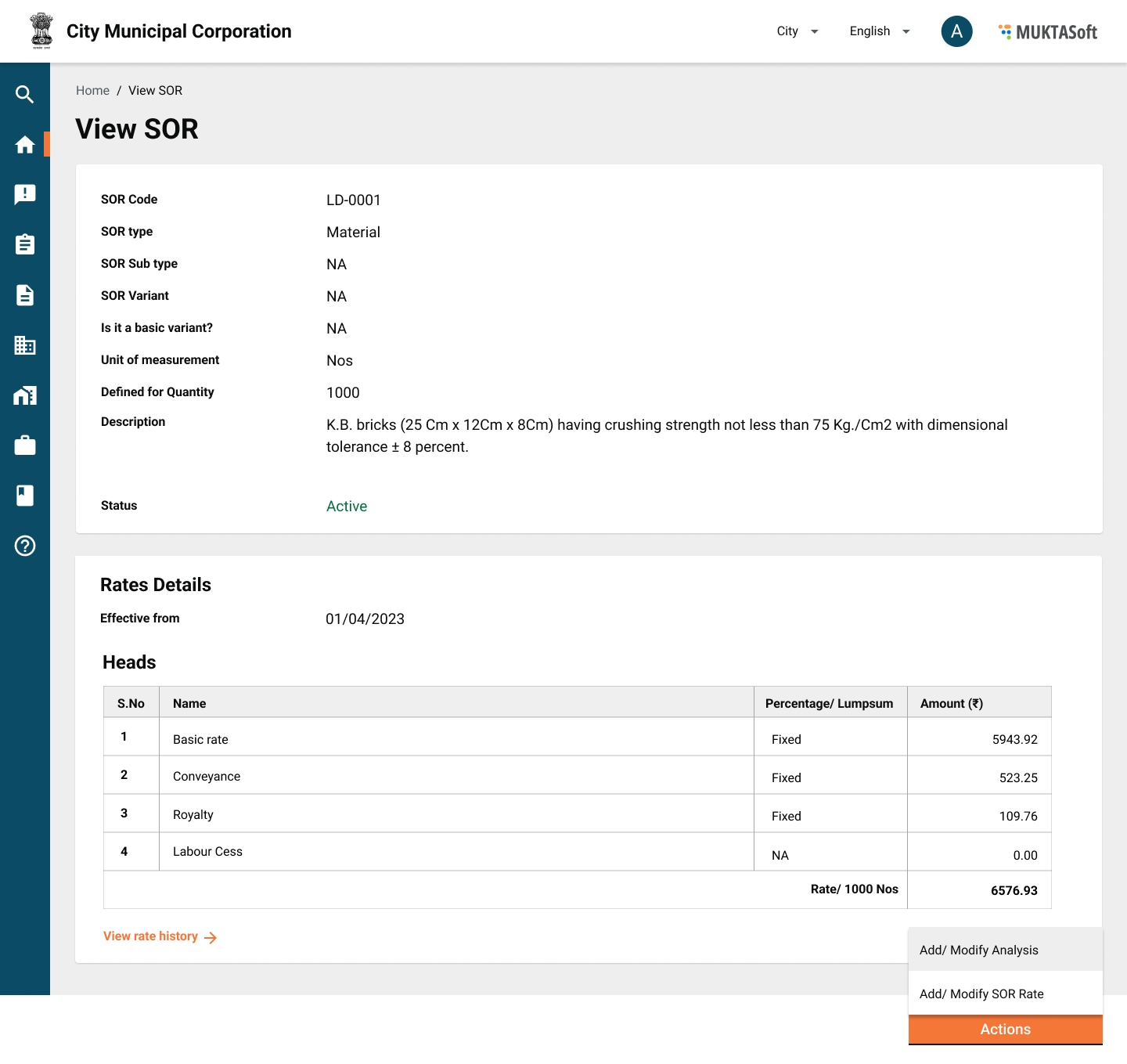
View SOR
It enables users to display the details of a SOR and then take the required action from there. E.g. Create Rate Analysis, View Rate Analysis, Modify SOR.
Attributes
1
SOR Code
It is system generated unique code to identify the SOR uniquely.
2
SOR Type
SOR types, the values from SOR Type Master.
3
SOR Sub Type
SOR sub types, the values from SOR Sub Type Master.
4
SOR Variant
SOR variant, the values from the SOR Variant Master.
5
Unit of Measurement
The unit of measurement.
6
Rate Defined for Quantity
The quantity of SOR for which rate is provided.
7
SOR Description
It is the description of SOR to describe the SOR.
8
Status
The status of SOR Active/ Inactive. Active means active for usage.
Rate
The rate section of SOR.
9
Effective From
The date from which the rate is effective.
Heads
10
Basic Rate
Basic rate of the SOR, provided by the state PWD.
11
Conveyance
Conveyance cost defined for the unit of quantity given in SOR.
12
Royalty
Royalty defined for the unit of quantity given in SOR.
13
Labour Cess
The amount of labour cess
14
Total Rate
The final rate of SOR.
Rate History
History of rates which were effective in the past.
15
Serial No.
Serial number of the record.
16
Effective From
The rate effective from date.
17
Rate
The net effective rate.
18
View Details
Button to view the break-up of rate.
19
Actions
Modify SOR/ Add Rate - Applicable to all types of SOR.
Create Rate Analysis - Applicable to Works type of SOR.
View Rate Analysis - Applicable to Works type of SOR.
Mockups
Modify SOR
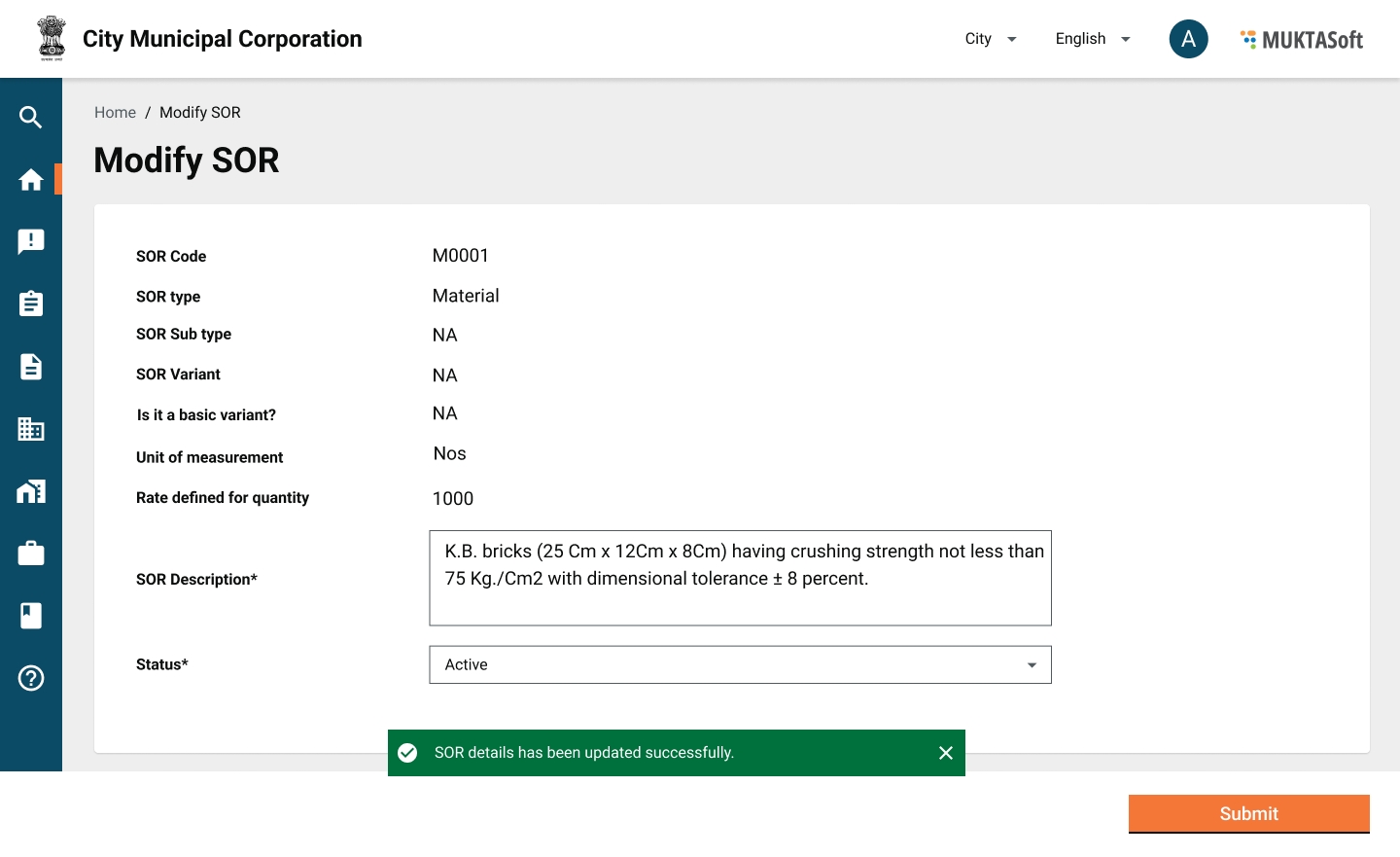
Modifying SOR enables the user to make the necessary corrections in the details and add the new rate effective from a future date.
Attributes
1
SOR Code
Display
It is system generated unique code to identify the SOR uniquely.
2
SOR Type
Display
SOR types, the values from SOR Type Master.
3
SOR Sub Type
Display
SOR sub types, the values from SOR Sub Type Master.
4
SOR Variant
Display
SOR variant, the values from the SOR Variant Master.
5
Unit of Measurement
Display
The unit of measurement.
6
Defined for Quantity
Display
The quantity of SOR for which rate is provided.
7
SOR Description
Text
It is the description of SOR to describe the SOR.
8
Status
Drop-down
The status of SOR Active/ Inactive.
Mockups
The screen to modify SOR is almost the same as creating SOR with the limitation mentioned in the above table.
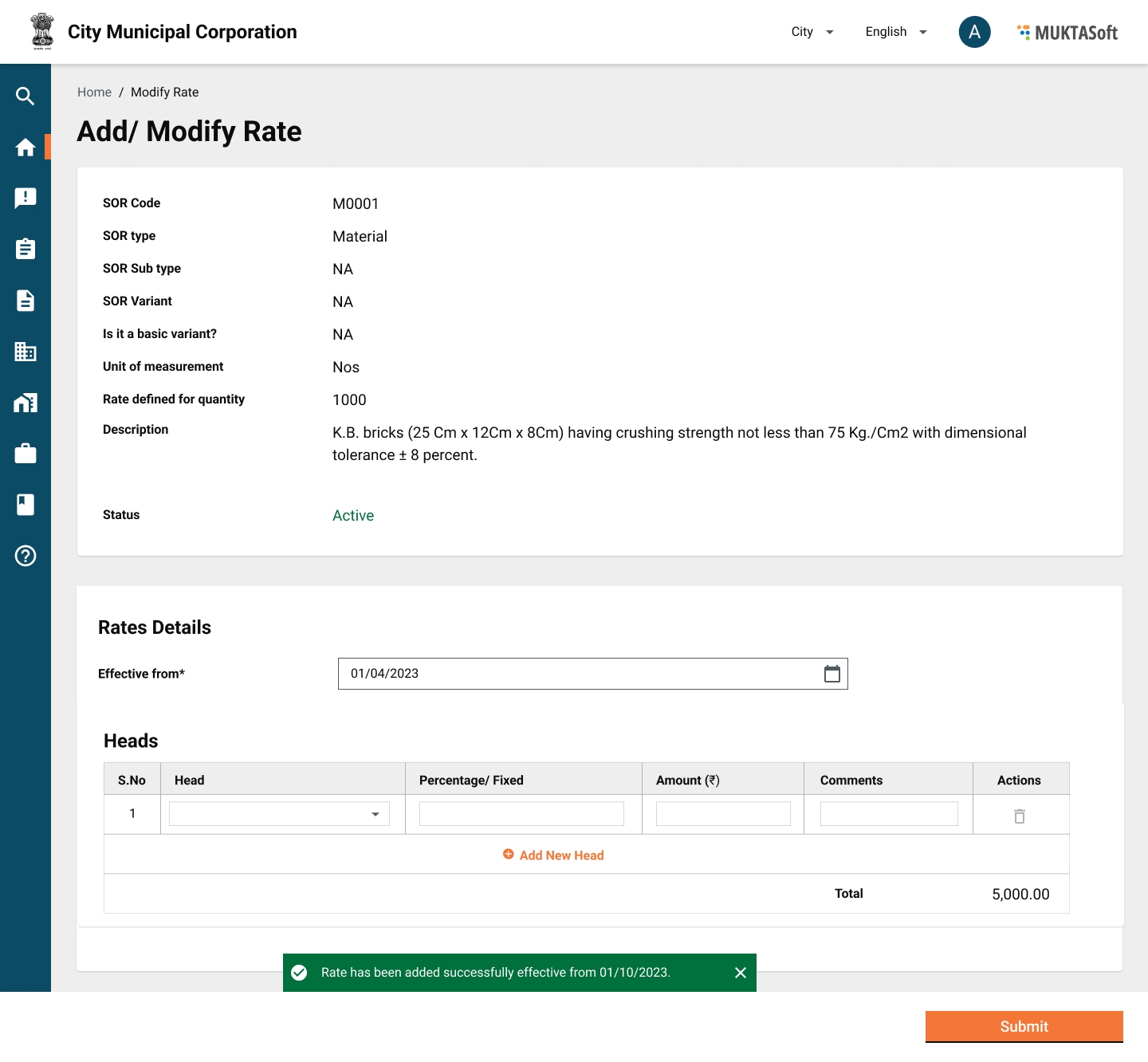
Add/ Modify Rate
Add Rate enables the user to add the new rate effective from a future date.
Attributes
1
SOR Code
Display
It is system generated unique code to identify the SOR uniquely.
2
SOR Type
Display
SOR types, the values from SOR Type Master.
3
SOR Sub Type
Display
SOR sub types, the values from SOR Sub Type Master.
4
SOR Variant
Display
SOR variant, the values from the SOR Variant Master.
5
Unit of Measurement
Display
The unit of measurement.
6
Defined for Quantity
Display
The quantity of SOR for which rate is provided.
7
SOR Description
Display
It is the description of SOR to describe the SOR.
8
Status
Display
The status of SOR Active/ Inactive.
Rate Details
9
Effective From
Date
The date from which the rate is effective. A future date.
Heads
Grid
It will enable the user to select and add a head applicable.
10
Basic Rate
Text
Basic rate of the SOR, provided by the state PWD.
11
Conveyance
Text
Conveyance cost defined for the unit of quantity given in SOR.
12
Royalty
Text
Royalty defined for the unit of quantity given in SOR.
13
Labour Cess
Display
The amount of labour cess, non editable.
14
Total Rate
Display
The final rate of SOR.
Mockups
The screen to modify SOR is almost the same as creating SOR with the limitation mentioned in the above table.
Detailed Estimate
After getting administrative approval on pre-estimation, a detailed estimate is prepared. In this, the estimate is divided into SOR, Non-SOR and Other Expenses and the quantities of various items are calculated individually by recording the detailed measurement of each activity. A detailed estimate is more accurate in terms of predicting the cost, material, labour, and machinery required to complete the work. It is also used for tendering and contracting the work.
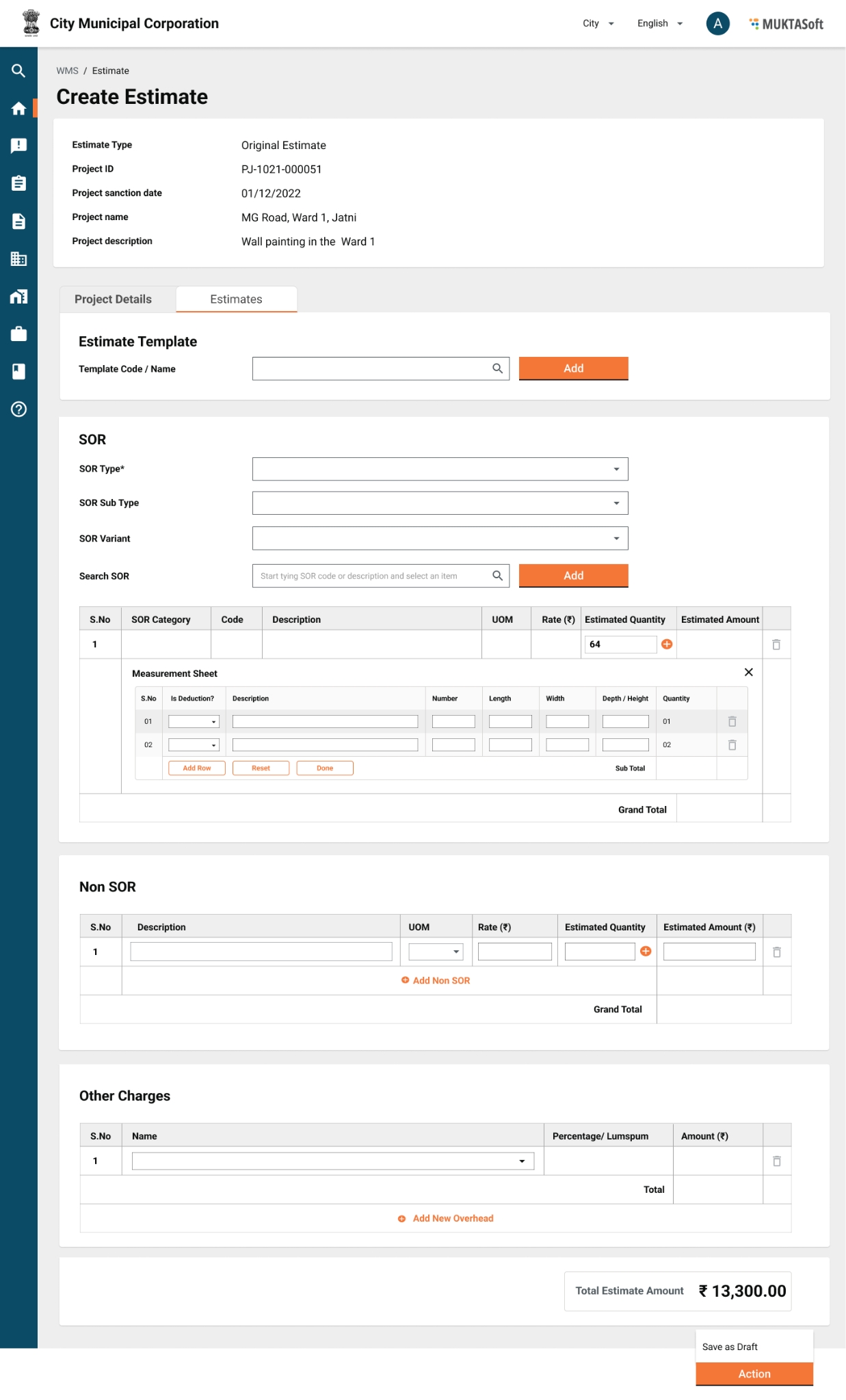
Create Estimate
Create estimate enables users to create a detailed estimate using the measurements taken from ground. The options of searching a template, and adding SOR using SOR search is provided on the create estimate page.
Search SOR
SOR Type - Drop-down to select a value for SOR type.
SOR Sub Type - Drop-down to select a value for the SOR sub type.
SOR Variant - Drop-down to select a value.
SOR - Drop-down with incremental/ fuzzy search on code or description.
Plus Measurements
These are the measurements which are added to the measurement to calculate the quantity of a particular SOR.
Minus Measurements
These are the measurements which are subtracted from the measurement to calculate the quantity of a particular SOR.
Attributes
1
Estimate Type
Display
Yes
Estimate type, Original/ Revised.
2
Project ID
Display
Yes
Project ID
3
Project Sanction Date
Display
Yes
Project sanction date
4
Project Name
Display
Yes
Project name
5
Project Description
Display
Yes
Project description
Search SOR - It provides the option to search a SOR and add to the estimate.
SORs
1
Code
Display
Yes
SOR code, unique identifier for each SOR.
2
SOR Description
Display
Yes
SOR description from the SOR master for the selected SOR.
3
Unit
Display
Yes
Unit of measurement
4
Rate
Display
Yes
The rate defined and effective currently.
5
Quantity
Display
Yes
Calculated value out of measurements.
6
Amount
Display
Yes
Calculated value and equal to Qty*Amount.
Measurements
1.1
Sr. No.
Display
Auto
Measurement serial number.
1.2
Type
Drop-down
Yes
Plus/ Minus measurements.
1.3
Name
Text
Yes
The name of the measurement.
1.4
Number (Nos)
Numeric
(6,2)
Yes
No. of items.
1.5
Length (L)
Numeric
(6,2)
Yes
Length measured
1.6
Breadth (B)
Numeric
(6,2)
Yes
Width measured
1.7
Height/ Depth
Numeric
(6,2)
Yes
Depth measured
1.8
Quantity
Display
Yes
Qty = N* L*B*D;
1.9
Total
Display
Yes
Grid total for the quantities of measurements
Analysis
1
Material Cost
Display
Yes
Cost of material out of SORs.
2
Labour Cost
Display
Yes
Cost of labours out of SORs.
3
Machinery Cost
Display
Yes
Cost of machinery out of SORs.
Action
1
Save
Button
Yes
Save the estimate as a draft.
2
Generate Analysis
Button
Yes
Generates the analysis and populates the figures.
3
Submit
Button
Yes
Submit the estimate for verification.
Mockups
Workflow
One additional step of adding and saving the estimate as a draft with the creator of the estimate is incorporated.
1
Save as Draft
Estimate Creator
Saved as draft
Drafted
2
Submit
Estimate Creator
Saved as draft
Pending for verification
Submitted
3
Verify and Forward
Estimate Verifier
Pending for verification
Pending for technical sanction
Verified
4
Technical Sanction
Technical Sanctioner
Pending for technical sanction
Pending for approval
Technically Sanctioned
5
Send Back
Estimate Verifier
Pending for verification
Pending for correction
Sent Back
6
Send Back
Technical Sanctioner
Pending for technical sanction
Pending for verification
Sent Back
7
Send Back
Estimate Approver
Pending for approval
Pending for technical sanction
Sent Back
8
Send Back To Originator
<roles having access>
<Current Status>
Pending for correction
Sent Back
9
Edit/ Re-submit
Estimate Creator
Pending for correction
Pending for verification
Re-submitted
10
Approve
Estimate Approver
Pending for approval
Approved
Approved
11
Reject
<any roles having access>
<Current Status>
Rejected
Rejected
Measurement Book
The measurement book is the most important record. It is the basis of all accounts of quantities of work done, and purchase made and it must contain such a complete record of facts as to be conclusive evidence in the court of law.
It is the basis of all accounts of quantities whether of works done by Contractors or by labourers employed departmentally, or materials received. It is so written the transactions are readily traceable.
MB Recording
All the measurements for the work completed are measured and recorded in the measurement book against each and every BOQ provided in the estimate. Once the complete quantity of the item mentioned in the estimate is consumed in MB the item is considered completed.
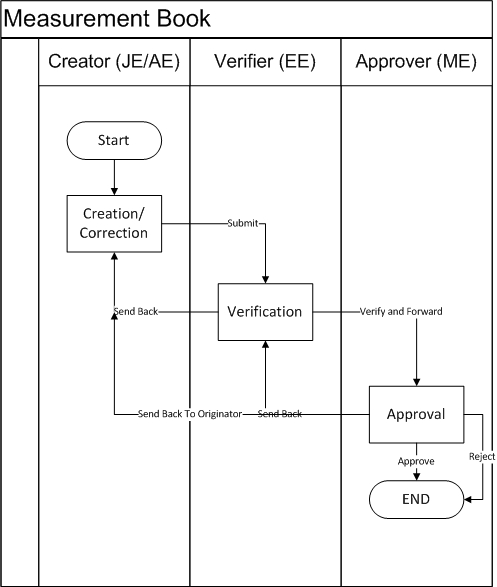
MB Process Flow
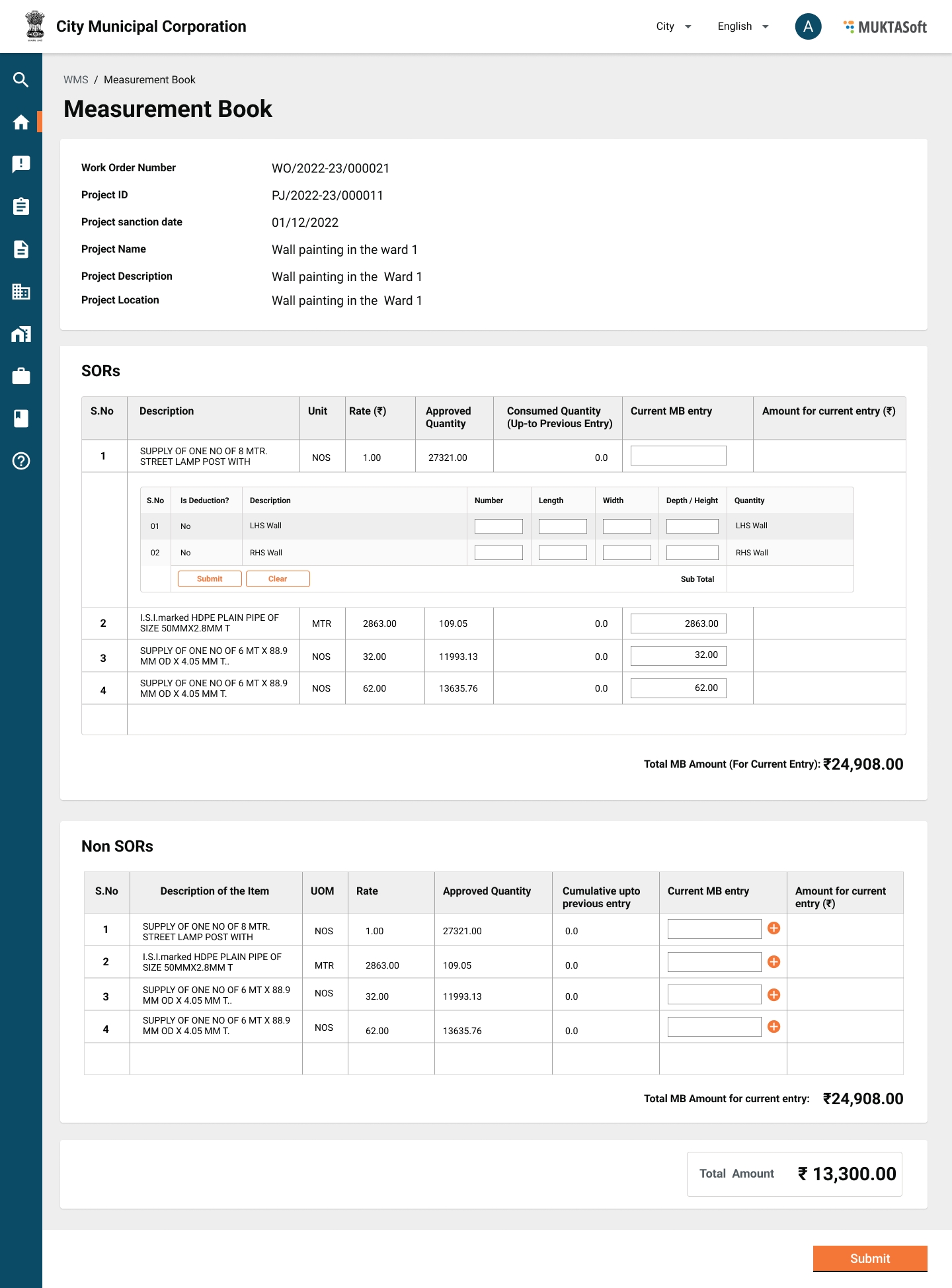
Create MB
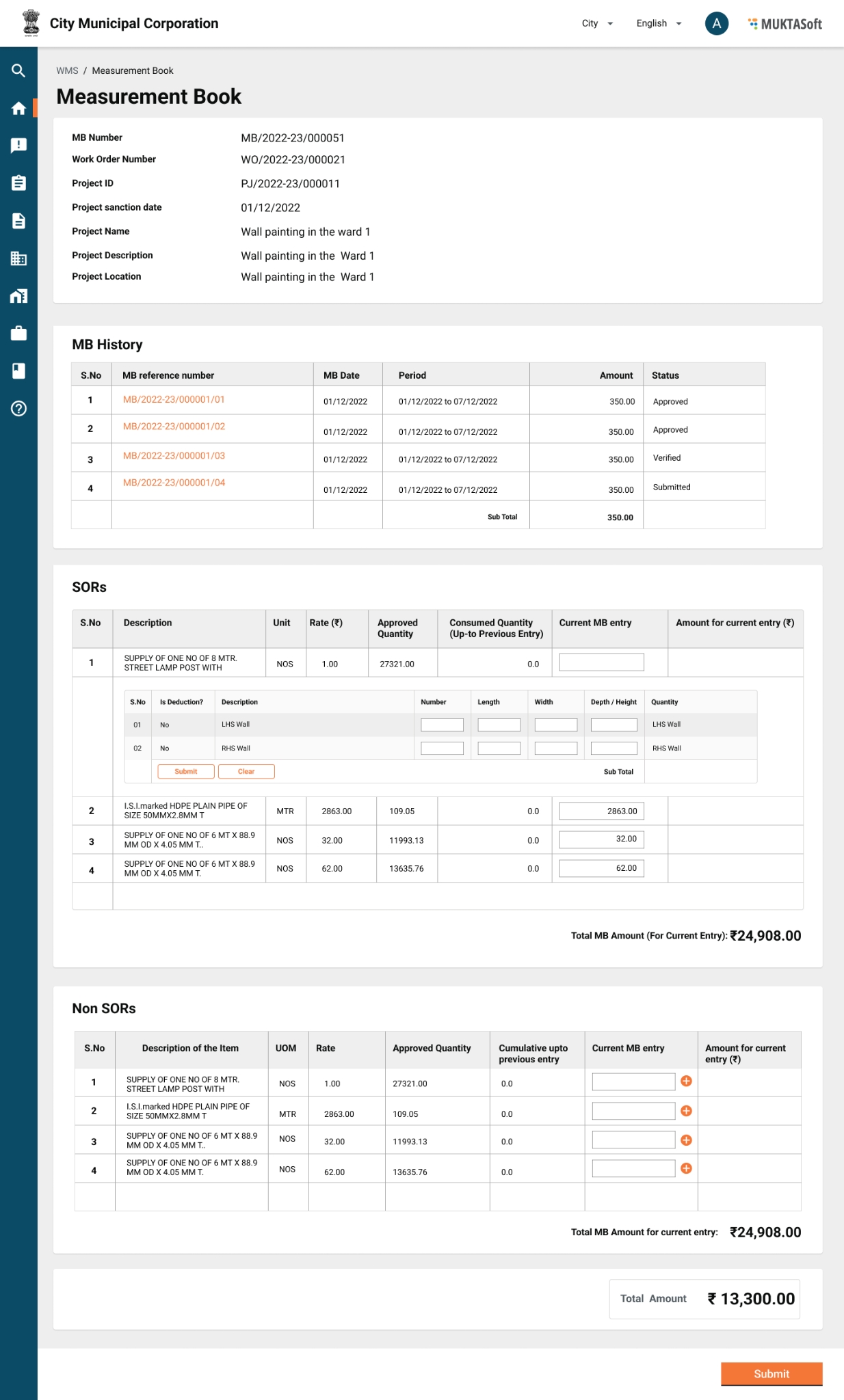
It enables users to capture the measurement of the completed works item (SOR/ Non-SOR) and create a record which becomes the basis of payment for the wage seekers, suppliers and supervisors (CBOs).
Attributes
1
Work order number
Display
NA
Work order number
2
Project ID
Display
NA
Project ID
3
Project sanction date
Display
NA
Project sanction date
4
Project Location
Display
NA
Project location
5
Project Name
Display
NA
Project name
6
Project Description
Display
NA
Project description
7
View MB History
Link
NA
To show the measurement history in the format given below.
Measurement History
1
Sr. No
Display
NA
Serial number
2
MB Reference Number
Display
NA
Measurement reference number
3
MB Date
Display
NA
Measurement date
4
MB Period
Display
NA
Measurement period
5
MB Amount
Display
NA
Measurement amount
6
Status
Display
NA
Status of the measurement.
Measurement Period - It has to be the same as muster roll period.
1
From Date
Date
Yes
Muster roll start date.
2
To Date
Date
Yes
Muster roll end date.
SORs
1
Category
Display
Yes
SOR Sub type
2
Code
Display
Yes
SOR Code
3
SOR Description
Display
Yes
SOR description from the SOR master for the selected SOR.
4
Unit
Display
Yes
Unit of measurement
5
Rate
Display
Yes
Rate per unit
6
Quantity
Display
Yes
Quantity calculated from measurement captured.
7
Amount
Display
Yes
Calculated from Rate*Quantity.
Measurements
1.1
Sr. No.
Display
Auto
Serial number of measurement
1.2
Type
Display
Auto
Plus/ Minus from estimate.
1.3
Name
Display
Auto
The name of the measurement from the estimate.
1.4
Number (Nos)
Numeric
(6,2)
Yes
No. of items if the unit of measurement is number.
1.5
Length (L)
Numeric
(6,2)
Yes
Length measured for completed work.
1.6
Breadth (B)
Numeric
(6,2)
Yes
Width measured for completed work.
1.7
Height/ Depth (D)
Numeric
(6,2)
Yes
Depth measured for completed work, allowed up-to 2 decimal places.
1.8
Quantity
Display
Yes
Qty = N*L*B*D; rounded up-to 2 decimal places.
1.9
Total
Display
Yes
Grid total for the quantities of measurements, rounded up-to 2 decimal places.
Non SORs - The above is repeated for Non SORs also.
View Utilization Statements - A link to view the utilization statements in HTML view.
Worksite Photos
Tab
7
Worksite Photo
Upload File
Yes
5 photos JPG and PNG images are supported.
Actions
1
Save as Draft
Button
Yes
Action to save the measurement record as draft.
2
Generate Utilization
Button
Yes
Action to generate measurement statements out of measurements taken.
3
Submit
Button
Yes
Action to submit the measurement book for verification
Mockups
Workflow
The table below illustrates the steps of workflow followed to approve the revised work order.
1
Save
MB Creator
Drafted
Drafted
2
Submit
MB Creator
Drafted
Pending for verification
Submitted
3
Verify and Forward
MB Verifier
Pending for verification
Pending for approval
Verified
4
Send Back
MB Verifier
Pending for verification
Pending for correction
Sent Back
5
Send Back
MB Approver
Pending for approval
Pending for verification
Sent Back
6
Send Back To Originator
<any roles having access of action>
<Current Status>
Pending for correction
Sent Back
7
Edit/ Re-submit
MB Creator
Pending for correction
Pending for verification
Re-submitted
8
Approve
MB Approver
Pending for approval
Approved
Approved
9
Reject
<any roles having access>
<Current Status>
Rejected
Rejected
Search MB
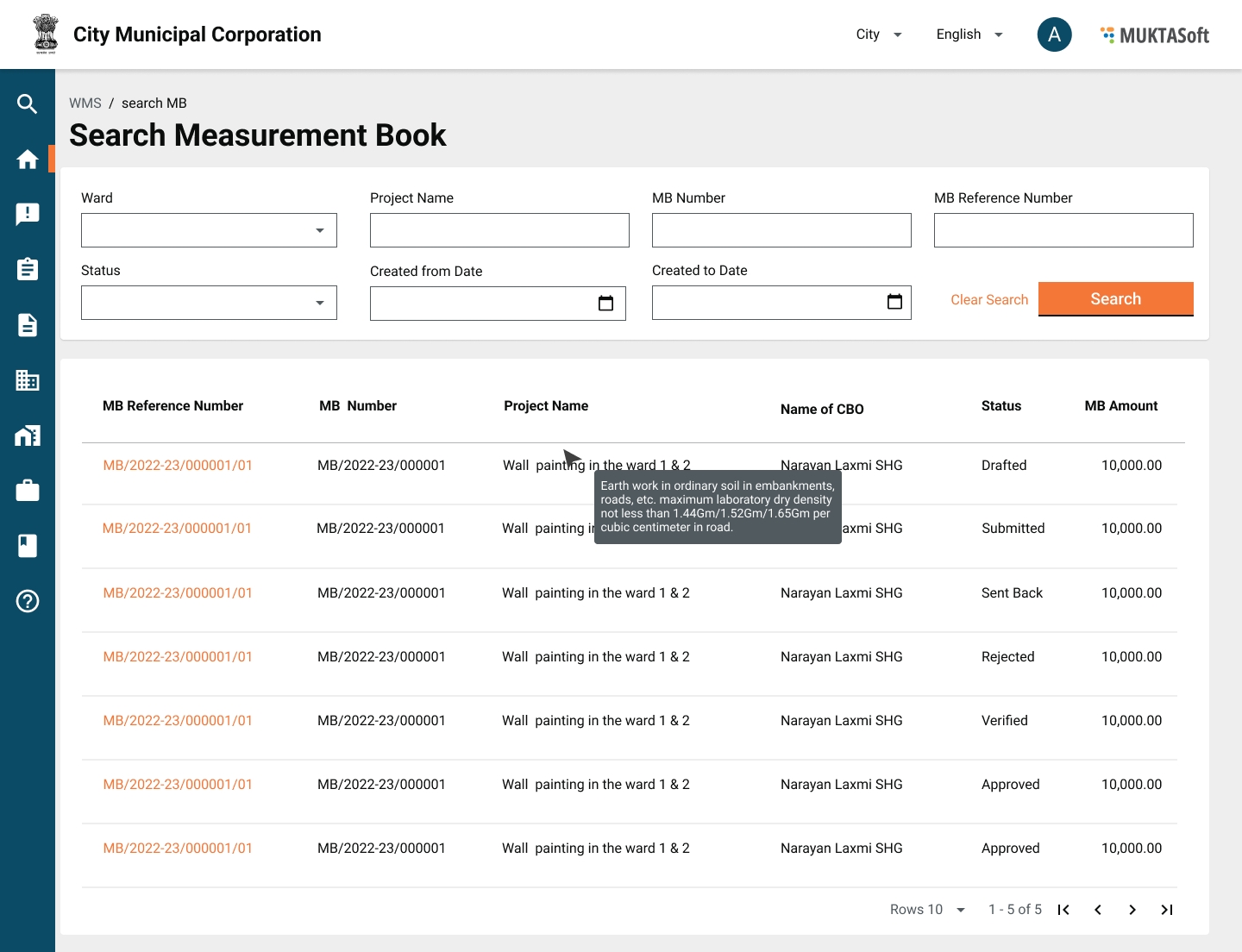
It enables users to search and MB recordings which are captured for a period and then sent for verification/ approval.
Search Criteria
1
Ward
Drop-down
Ward name from the configured data.
2
Project Name
Text
Project name
3
MB Number
Text
MB number
4
MB Reference Number
Text
MB reference number
5
Status
Drop-down
Active/ Inactive.
6
Created From
Date
MB created date
7
Created To
Date
MB created date
Search Result
1
MB Reference Number
MB reference number.
2
MB Number
MB number
3
Project Name
Project name
4
CBO Name
Name of CBO to whom work order is awarded.
5
Status
Status of MB.
6
MB Amount
MB amount.
Mockups
View MB
It enables the users to view the details and workflow status of the measurement book.
Attributes
View measurement book displays all the details related to it as given below.
MB Reference Number
MB Number
Work Order Number
Project ID
Project Sanction Date
Project Location
Project Name
Project Description
Measurement History
Sr. No
MB Reference Number
MB Date
MB Period
MB Amount
Status
Measurement Period
From Date
To Date
SORs/ Non SORs
SOR Category
SOR Code
SOR Description
Unit
Rate
Quantity
Amount
Measurements
Sr. No.
Type
Name
Number (No)
Length (L)
Breadth (B)
Height/ Depth (D)
Quantity
Total
Analysis
Material Consumed (₹)
Labour Utilized (₹)
Machinery Utilized (₹)
Workflow Timelines
Mockups
The screen is similar to creating MB in the display mode of information including timelines.
Was this helpful?